Staging directory transition
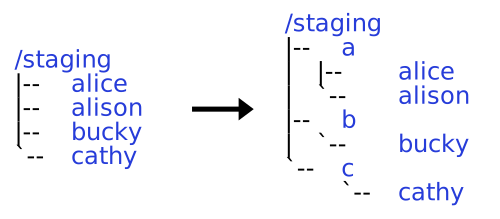
/staging directory structure transition.Transition to a new /staging directory structure
Starting May 15, we are transitioning to a new directory structure for personal staging directories. This affects all users on the HTC system. Plan to adjust your workflows by August 31st. See What you should do for details.
Personal staging directories will now be located in alphabetized subdirectories based on the first letter of your NetID. For example:
Previous /staging directory path |
New /staging directory path |
|---|---|
/staging/netid |
/staging/n/netid |
/staging/bucky |
/staging/b/bucky |
Group /staging directories are not affected and will remain in the /staging/groups subdirectory.
Transition process
CHTC will:
- Move your files and quota limits to your new
/stagingdirectory. - Create a symlink at your previous
/stagingdirectory path that points to the new/stagingdirectory path.
Timeline
- Before May 15.
- Use
/staging/netidin your jobs.
- Use
- Between May 15 - August 31.
- Data is available at a new path (
/staging/n/netid). - Start transitioning jobs to use this new path.
- Data is available at a new path (
- After August 31.
- You must use
/staging/n/netidin jobs. - Symlinks at previous
/stagingdirectory paths will be deleted.
- You must use
What you should do
If you have an existing /staging directory, between May 15 and August 31, please review all your files that reference your /staging directory. This may include but is not limited to:
- HTCondor submit files
- Executables and scripts
- Environment variables
- DAGMan files
Please change any reference to your personal /staging directory to the new path.
For example, in an HTCondor submit file, change:
container_image = osdf:///chtc/staging/netid/my-container.sif
to:
container_image = osdf:///chtc/staging/n/netid/my-container.sif
Use the environment variable
STAGING
We have set the environment variable
STAGINGon the Access Points to refer to your personal staging directory. For example:[netid@ap2001] echo $STAGING /staging/n/netidYou may use this environment variable in your submit file:
container_image = osdf:///chtc$ENV(STAGING)/my-container.sifHTCondor will replace
$ENV(STAGING)with the path to your personal staging directory (i.e.,/staging/n/netid). See HTCondor docs for more details about the$ENV()macro.If you want to refer to your staging directory using the
$STAGINGenvironment variable in your jobs, add this to your submit file:environment = "STAGING=$ENV(STAGING)"
Why we are transitioning
Our /staging directories are backed by the Ceph File System, which has slower performance when it must load very large directories. To mitigate large loads on the file system, we are sorting users personal staging directories into alphabetized subdirectories.
Get support
If you have questions or concerns, please email us at chtc@cs.wisc.edu.